Geo-Plus
Geo-Plus · pointcloud

VisionLidar

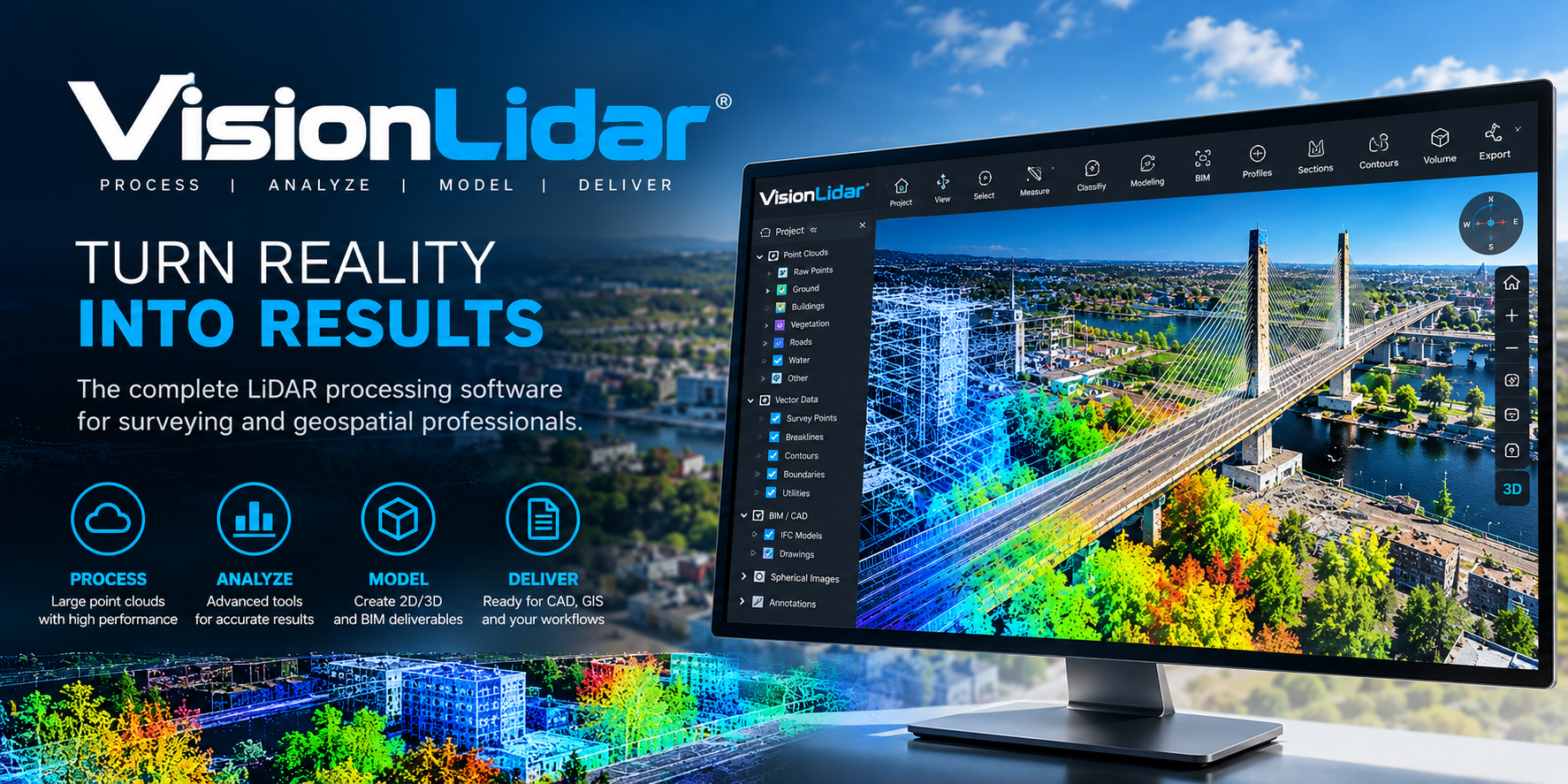
Desktop point cloud software processing, engineered for production.

Process, classify and deliver massive LiDAR datasets on your workstation — from raw scans to CAD-ready outputs.

AutoCADCivil3DMicroStationBricscadMap3D
VisionLidar interface

What’s new in version 2027

VisionLidar · from 36.1.84.16 to 37.0

Interface

A new interface, the same engines

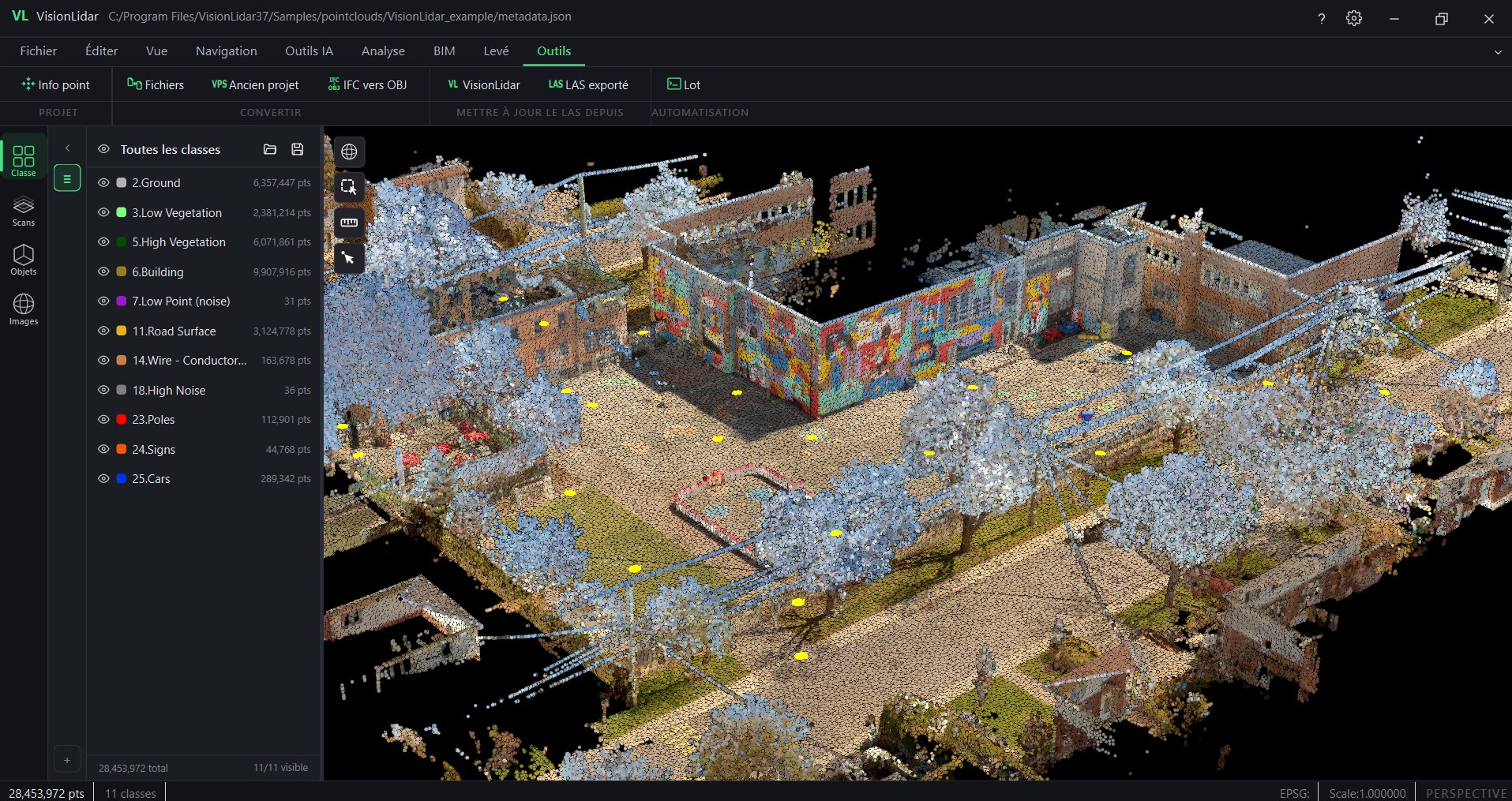
  • Modern application frame

    A native Qt window replaces the previous interface; processing engines are unchanged.

  • Ribbon or compact menu

    Expandable ribbon with contextual toolbars; switch to the compact menu if you prefer.

  • Dockable left panel and toolbar

    Detach, dock and resize; list views for images, utilities (poles, spans, lines), edges, markings, lines and objects.

  • Navigation cube

    Preset views and N / S / E / W axes in the 3D scene; expandable floating tool groups.

VisionLidar 37.0 main window with ribbon

AI

VisionLidar 2.0 AI engine: classification and training

  • One engine everywhere

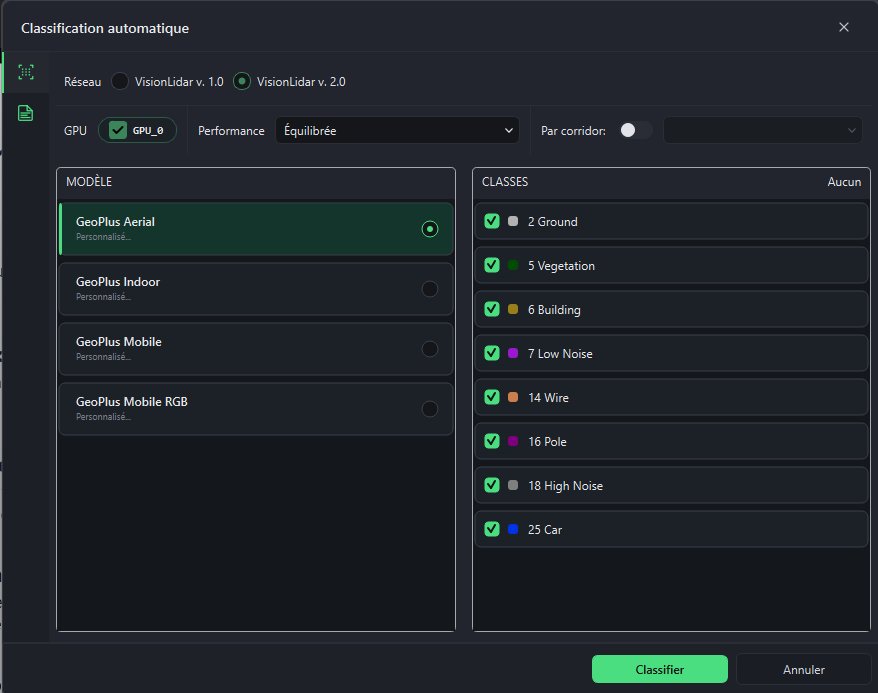
    The VisionLidar 2.0 (transformer) engine now powers Classify LAS as well as new projects.

  • Classification at project creation

    Run automatic classification while creating the project.

  • Train a new model in one place

    Manual classification, selection and box tools in the training workflow; fence check before export.

  • Class management

    Batch-reassign class numbers to match your exports or models; updated definitions.

  • Your own PLY files

    Use PLY files labelled in other software to train in VisionLidar.

Automatic classification dialog with the VisionLidar 2.0 engine

Input and output

New formats, structured exports and batch processing

  • More ways to create a project

    PLY from any software, RCS (Autodesk ReCap), and E57 + LAZ + RCS combined in one project; FARO SCENE 2026 compatibility.

  • Structured E57 export

    Per-scan grouping, metadata and point attributes preserved on export; faster LAZ updates.

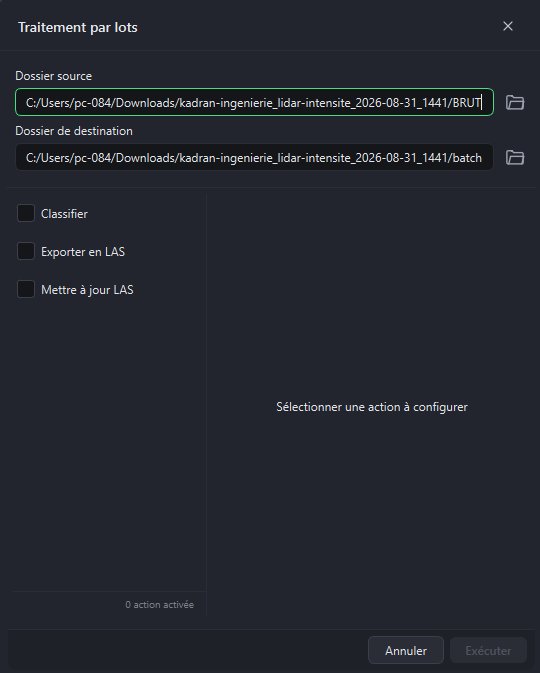
  • Batch processing

    Run classification, catenary or road-marking detection on entire folders.

Batch processing dialog

Also new

Also new in VisionLidar

  • Utility analysis reports

    Pole tilt, line clearance and collision reports exported to CSV, PDF and GeoJSON; pole radius shown as a cylinder.

  • Scan to Mesh and Refined Mesh

    Meshing tools, renamed and refreshed.

  • Volume calculation

    Improved volume calculation workflow.

  • Two-click quick section

    Analysis › Sections: two clicks and the section is created.

  • Grouped registration tools

    Point-to-point, list-based, origin change and reindexing grouped under Tools.

  • Spherical images

    Choose the image folder manually if automatic detection fails; rotate from the toolbar; simpler deletion.

  • Image-only projects for VL365

    Publish a spherical-image project to VL365 without a point cloud.

  • Detections at a glance

    Lists of utilities, edges, road markings and lines in the left panel; one click to locate them in the scene.

Turn your point clouds into actionable results

From processing billions of points to producing professional deliverables, VisionLidar speeds up every step of your LiDAR workflow.

Several billion
points per project
128 classes
to segment your data
4 LiDAR sources
airborne, drone, terrestrial and mobile

The 5 benefits that make the difference

01

Handle very large-scale projects

Manage several billion points smoothly thanks to tiling, whether your data comes from an airborne, terrestrial or mobile survey.

02

Automate classification and detection

Speed up processing with ground, building, vegetation and noise classification algorithms, plus batch object detection.

03

Survey directly inside the point cloud

Measure, vectorize and extract poles, curbs, road markings and power lines, then store them as points or polylines.

04

Produce professional deliverables

Create TIN surfaces, contours, profiles, cross-sections, alignments and volume calculations in one integrated workspace.

05

Connect LiDAR to your ecosystem

Send extracted features to AutoCAD, BricsCAD or MicroStation, then archive, publish and share your projects with VisionLidar365.

Billions of points.
Faster decisions.

Who it's for

Survey firms, LiDAR service providers, transportation & utility engineers.

Handle billions of points

Streaming engine keeps huge scans responsive on standard workstations.

Automatic classification

Ground, vegetation, buildings and powerlines segmented in minutes.

CAD-native output

Export directly into AutoCAD, Civil3D, MicroStation and Bricscad.

Feature extraction

Cross-sections, breaklines, curbs, and DTMs generated from point data.

Choose your edition

VisionLidar

VisionLidar Standard

Entry-level processing for small crews and single projects.

  • Visualize and navigate point clouds up to 1 billion points
  • Basic manual and semi-automatic classification tools
  • Standard export to AutoCAD, Bricscad and MicroStation
  • Email support during business hours
Get a quote for VisionLidar Standard
Most popular
VisionLidar Premium

Professional-grade automation for production teams.

  • Everything in Standard, plus unlimited point cloud size
  • Automatic ground, vegetation, building and powerline classification
  • Feature extraction: breaklines, cross-sections, curbs and DTMs
  • Priority support and software maintenance
Get a quote for VisionLidar Premium
VisionLidar Ultimate

Enterprise power for high-volume and multi-user workflows.

  • Everything in Premium, plus batch processing automation
  • Custom AI classification models and training pipeline
  • Multi-user project sharing and version control
  • Dedicated account manager and onboarding
Get a quote for VisionLidar Ultimate
Customer story

"CIMA+ cuts its point cloud footprint by 75% with VL365"

From 40 TB of structured scans to 10 TB of unified LAZ on VL365: same accuracy, same density, same immersive 360° views — no more per-scan-position billing and no format lock-in.

Read more customer stories →
Talk to an expert

Request a VisionLidar demo

Tell us about your project, a senior specialist will get back within one business day.

By submitting, you agree to be contacted by Geo-Plus about your inquiry. We never share your data.

Ready to see VisionLidar in action?

Book a live demo tailored to your workflow.